Sneak peek: Google app is preparing a big change for its bottom bar
Affiliate links on Android Authority may earn us a commission. Learn more.
Sneak peek: Google app is preparing a big change for its bottom bar
Nov 2, 2026 — 3:56 PM ET
- Google is working on a “You” tab that could replace the “Activity” tab in the Google app.
- In addition to various history groups, the new tab would include your profile picture, email, and a drop-down icon for the account switcher.
- A pinning feature for your AI conversations could also be on the way.
Google just recently announced redesigns for the Messages, Contacts, and Phone apps. As those redesigns roll out, the company is quietly toiling away on another change, this time targeting the Google app. This update could shake up the tab bar, replacing one of the tabs with something new.
You’re reading an Authority Insights story. Authority Insights brings you all the latest exclusive reports, app teardowns, leaks, and in-depth tech coverage from the Android Authority team that you won’t find anywhere else.
The current version of the Google app has four tabs located at the bottom of the screen. This tab bar includes Home, Search, Notifications, and Activity. The Activity tab is where you go if you want to check on your AI Mode history or normal search history. This page also includes sections for Saved items, Collections, Recent Songs Searches, and Lens Searches.
While digging into version 17.72.13.sa.arm64 of the Google app, we found that Google is working on a UI change. This change would introduce a new “You” tab, and it would replace the Activity tab. In the screenshots below, you can see what this new You tab brings to the table.
First and foremost, your profile picture is featured prominently at the top of the page. The header area also includes your email address and a drop-down icon. You’ll use this drop-down icon to access the account switcher, which shows at the bottom of the screen. In the top right corner, you’ll also find a gear icon to open the Google app settings page.
Along with these details, there are sections for Saves & collections, Lens searches, and Song searches. For whatever reason, AI mode history and regular search history are missing on this page. We suspect these sections are likely missing because the You tab is still a work in progress.
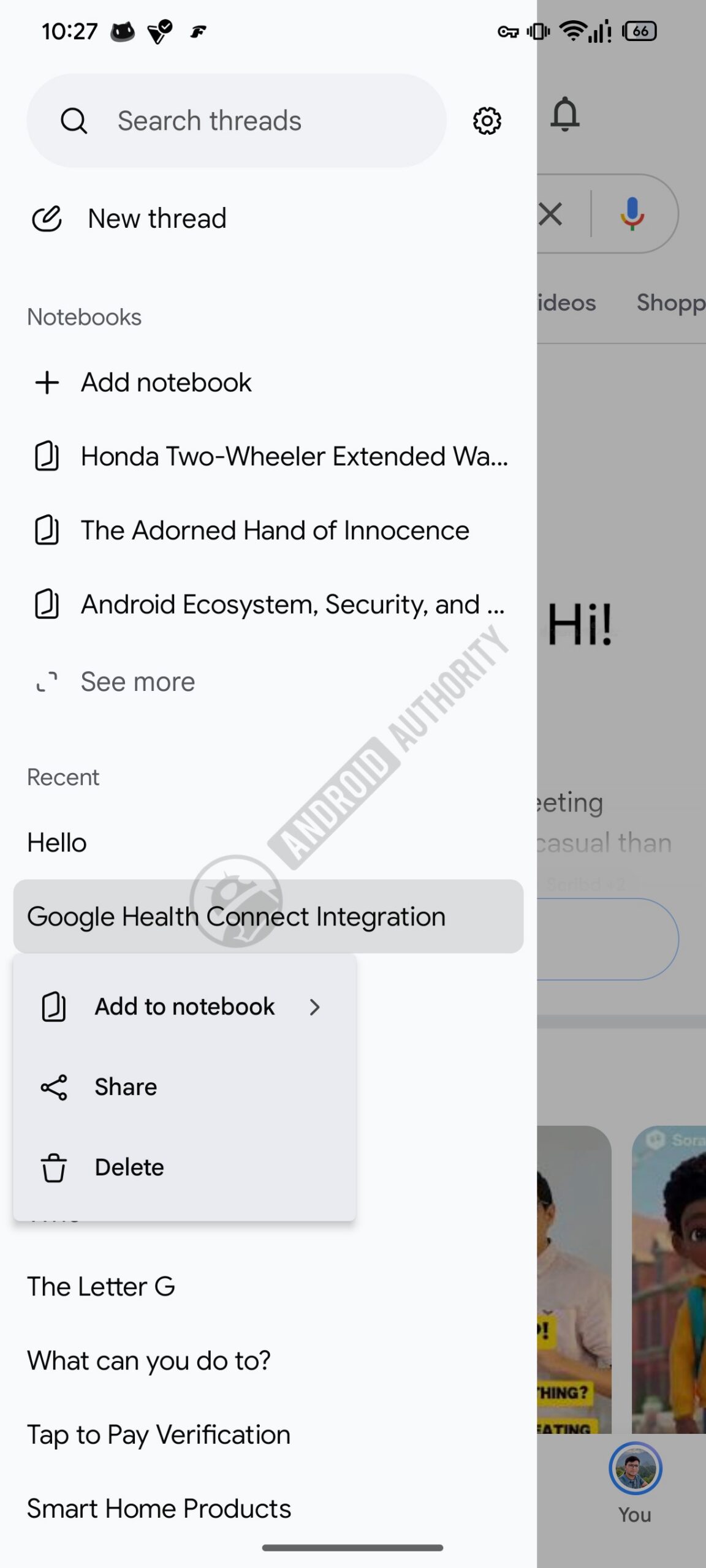
Something else we noticed during our investigation is that the tech giant is working on a pinning feature for your AI Mode conversations. Currently, if you access your AI Mode search history from the sidebar in the Google Home screen, long pressing on a thread/conversation in “Recent” section shows the following options: Add to notebook, Share, and Delete.
We found strings of code suggesting a new pin/unpin option could be added to this menu in the future.
<string name="googleapp_aim_threads_pin_text">Pin</string>
<string name="googleapp_aim_threads_unpin_text">Unpin</string>
Additionally, we found a few plural strings, which hint that you may be able to select multiple chats to pin/unpin at the same time.
<plurals name="assistant_robin_threads_ia_bulk_pinned_confirmation">
<item quantity="one">%1$d chat pinned</item>
<item quantity="other">%1$d chats pinned</item>
</plurals>
<plurals name="assistant_robin_threads_ia_bulk_unpinned_confirmation">
<item quantity="one">%1$d chat unpinned</item>
<item quantity="other">%1$d chats unpinned</item>
</plurals>
Source: Read original article


Comments ()