Samsung Gallery can finally sync your photos directly to Google Photos
Samsung Gallery can finally sync your photos directly to Google Photos
Samsung has launched Galaxy Sync, allowing users to back up photos and videos from Samsung Gallery to Google Photos.

What you need to know
- Samsung has introduced Galaxy Sync, allowing Galaxy users to back up photos and videos directly to Google Photos.
- The new integration lets users access synced photos across Galaxy devices without switching to the Google Photos app.
- Galaxy Sync is rolling out with One UI 9, but older photos already stored in Google Photos won't appear in Gallery.
Samsung has finally announced Galaxy Sync for Galaxy smartphones, allowing users to automatically sync photos and videos from Samsung Gallery to Google Photos in the background.
After Samsung ended its partnership with Microsoft OneDrive earlier this year, there were reports that the company would partner with Google to bring a new Gallery Sync feature to Galaxy smartphones, allowing users to sync their photos directly from Samsung Gallery to Google Photos. And now, the feature is finally here.
According to Samsung's official announcement, the new Gallery Sync feature allows users to back up their photos and videos directly to Google's cloud storage without having to switch to another app. All you need to do is sign in with your Samsung and Google accounts and enable the feature in the Gallery app.
What's interesting is that the new integration also makes it easier to access your photos across multiple Galaxy devices.
For example, if you take a photo on your Galaxy smartphone, you'll be able to see it in the Gallery app on your Galaxy tablet, provided both devices are signed in with the same accounts and have syncing enabled.
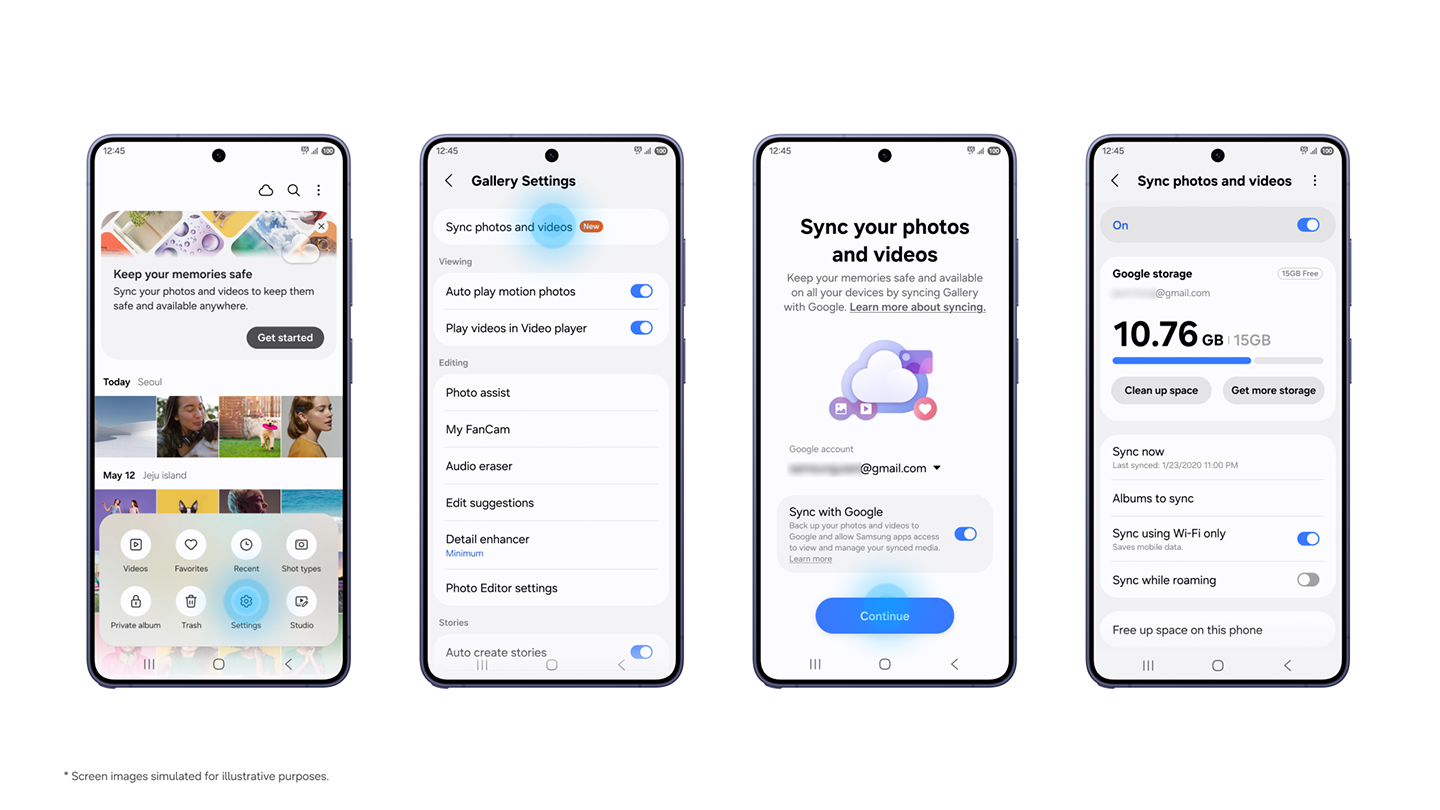
Samsung is also introducing a new "Free up space on this phone" feature that lets users remove photos and videos from their device once they've been backed up to Google storage. The Gallery app will continue showing thumbnails of those files, and you can download the original versions whenever you need them.
As for storage, the feature uses your existing Google account storage, which is shared across Google Photos, Gmail, and Google Drive. This means you get the same 15GB of free storage that comes with a Google account.
Get the latest news from Android Central, your trusted companion in the world of Android
If you need more space, you can subscribe to one of Google's paid storage plans. It's also worth noting that Google recently increased the storage included with its Google AI Pro plan from 2TB to 5TB, which could come in handy here.
There is, however, one limitation worth keeping in mind. The new integration doesn't mean your entire Google Photos library will automatically appear in Samsung Gallery. For now, only photos and videos synced through Samsung Gallery after enabling the feature will show up across your supported Galaxy devices.
In terms of compatibility, Galaxy Sync has started rolling out to Galaxy devices running One UI 9, and Samsung says it will expand availability to more devices in phases.

Sanuj is a tech writer who loves exploring smartphones, tablets, and wearables. He began his journey with a Nokia Lumia and later dived deep into Android and iPhone. He's been writing about tech since 2018, with bylines at Pocketnow, Android Police, Pocket-Lint, and MakeUseOf. When he's not testing gadgets, he's either sipping chai, watching football, or playing cricket.
You must confirm your public display name before commenting
Please logout and then login again, you will then be prompted to enter your display name.
Source: Read original article

Comments ()