PROLED MacBook Pro review: Great hardware, maybe wait for M7

The 16-inch MacBook Pro finally goes OLED, with the new PROLED XDR screen stealing the show. Touch, fortunately, isn't overdone, or necessary at all.
Apple spent years perfecting the MacBook Pro's mini-LED screen. It was bright, sharp, and genuinely very good.
Not good enough for Cupertino, apparently.
The new 16-inch MacBook Pro moves to a tandem OLED panel Apple calls PROLED XDR. On paper, it is the biggest display leap the Mac has ever taken.
It arrives with a touch screen, a Dynamic Island, and a rebuilt cooling system. There is a lot to unpack here.
| Product | Apple 16-inch MacBook Pro with PROLED XDR Display |
| Base price | $3,399 |
| Chip | Apple M5 Pro or M5 Max |
| CPU | 18-core (6 super, 12 performance), per Apple's spec |
| GPU | 20-core (M5 Pro); 32-core or 40-core (M5 Max) |
| Neural Engine | 16-core, with GPU Neural Accelerators |
| Unified memory | Up to 64GB (M5 Pro); up to 128GB (M5 Max) |
| Memory bandwidth | 307GB/s (M5 Pro); up to 614GB/s (M5 Max) |
| Storage | Up to 4TB (M5 Pro); up to 16TB (M5 Max) |
| Display | 16.3-inch PROLED XDR tandem OLED, touch, 3472 x 2266, 254 ppi |
| Brightness | 1,000 nits sustained, 2,000 nits peak (HDR and SDR) |
| Contrast | 10,000,000:1 |
| Refresh rate | ProMotion, adaptive 10Hz to 120Hz |
| Color | P3 and Adobe RGB, 1 billion colors, True Tone |
| Battery | 100Wh; up to 24h video (M5 Pro), 22h (M5 Max) |
| Ports | 3x Thunderbolt 5 (120Gb/s), HDMI, SDXC, MagSafe 3, 3.5mm |
| Wireless | Apple N1, Wi-Fi 7, Bluetooth 6, Thread |
| Camera | 12MP Center Stage, Desk View, 1080p |
| Audio | Six-speaker, force-cancelling woofers, three-mic array |
| Dimensions (inches) | 0.63 x 14.0 x 9.62 |
| Weight | 4.0 lb (M5 Pro); 4.1 lb (M5 Max) |
| Colors | Space Black, Silver |
MacBook Pro 16-inch review: A lighter, bolder redesign
This is the first real redesign of the Pro chassis in years. You feel it the moment you pick it up.
The 16-inch model now weighs 4.0 pounds, down from 4.7. That is nearly three-quarters of a pound gone, which is a lot at this size.

MacBook Pro review: From top to bottom - MacBook Neo, MacBook Air, MacBook Pro
We got similar weight reductions on the 13-inch model too, dropping from 3.5 pounds to 3.0 pounds.
The display borders are slimmer, too. The screen feels like it floats closer to the edges than before.
Apple has also brought the iPhone's Dynamic Island to the Mac. It's a choice that has induced internet drama. On the surface, the logic for having it on MacBook Pro is less obvious than on a phone. More on Dynamic Island in a bit.
The headline change, though, is touch. Intricuit and Modbook aside, this is the first Apple-made MacBook you can prod, pinch, and scroll with a finger.
Apple built the touch sensor into the panel itself, rather than layering it on top.
The MacBook Pro has been a workhorse machine, rarely shying away from power just because of its portable design. After just toting it around for a few days, the upgraded design is well worth it.

MacBook Pro review: The new MacBook Pro models have recessed feet which helps reduce their height on your desk
That weight difference is noticeable from the moment you pick up the MacBook Pro, and it carries through to the user experience. Interestingly, the bottom feet are recessed into the lower case, so the laptop doesn't sit as high on your desk, and typing doesn't feel as bouncy.
When you open the laptop, you feel how much thinner the top is.
The premium feel has not been lost, despite being thinner and lighter. If you are a photographer, developer, or any other power user that is carrying this around regularly, the lighter design makes a good case for itself.
When Apple launched the new iPhone 18 Pro, one of the new changes was a smaller Dynamic Island. On the Mac, Apple went from a notch to the hole-punch camera, and it's far more noticeable than the iterative change on iPhone.

MacBook Pro review: The notch on the old MacBook Pro took up so much space and menu items had to go around it
The old notch was larger and took up a lot of menu bar space. We'd frequently have items wrapping around to the other side in the menu bar.
By moving to the smaller Dynamic Island, there's room in the menu bar. And, it's also the home for Live Activities.
The Live Activity UI has so good on mobile, it's a little surprising that it took this long for Apple to bring it to the Mac. It does take up more space, but it's the most elegant way to keep track of timers, media, or see system controls.

MacBook Pro Review: The Dynamic Island is a great upgrade
Items shrink down and they expand when you go over them with your mouse or hold on them with your finger. Older machines get this too with an update to macOS, but it works better with the camera cutout than the larger notch.
Speaking of the touch input, your mileage is certainly going to vary. It's not a must-have feature for most, but there's also no reason to get mad that it exists. Use it if you want, but there isn't and probably won't ever be a mandate to use it.
Apple has updated in places to support touch, but it isn't an overhaul of the system that puts touch first. It's small stuff, like holding on an item in the dock to open the contextual menu.
You can swipe up and down to scroll, drag things around between windows, and pinch and zoom into photos. Working with media was particularly effective with the touch controls.

MacBook Pro review: Some elements expand and react to your touch, like the stoplight window buttons
The stoplight icons for window management work great and expand as you touch and hold on them so you can still see, but some menus are too small. There's definitely still work and polish that needs to be done.
More often than not, a trackpad or mouse is just as fast, or faster, than using touch.
This is probably the right approach though, because macOS doesn't get a radical change that changes everything about it to optimize for touch. Instead you get the same, excellent macOS experience with an optional bonus layer of touch for those that want to use it.
What we would like to see is a little less bounce in the screen when the touchscreen is being used. It's still a little bouncy, so perhaps this is where the extra half-pound that got shaved off would have made a difference.
MacBook Pro 16-inch review: The PROLED XDR display
The PROLED XDR display is why you buy this machine, and is the best display Apple has ever put in a laptop. While Apple's mini LED backlit display is fantastic, the PROLED display is superb.
Tandem OLED stacks two OLED layers to push out more light. The result is a 16.3-inch screen at 3472 by 2266, holding the familiar 254 pixels per inch.

MacBook Pro review: The new MacBook Pro with PROLED
Peak brightness climbs to 2,000 nits, and for both HDR and SDR content. The old mini-LED panel managed 1,600 nits, and only for HDR. This goes brighter, and does it everywhere.
Contrast is the bigger jump. It leaps from 1,000,000 to one on mini-LED, up to 10,000,000 to one here.
OLED's per-pixel blacks are the reason why. Dark scenes lose the faint glow that even good mini-LED tends to leave behind.
Apple has also added Adobe RGB alongside the usual P3. Photographers and print designers will clock that straight away.

MacBook Pro review: The MacBook Pro comes in 14-inch and 16-inch models
ProMotion carries over, with an adaptive range now stretching from 10Hz to 120Hz. The nano-texture glass option remains for anyone battling glare.
It is, simply, a stunning screen. Even going from mini LED, the PROLED looks fantastic in use.
It's a gorgeous display with inky black and vivid peak brightness. Colors pop and whether you're editing content or consuming media, it looks great.

MacBook Pro review: The PROLED display looks great, especially with HDR content
There's a lot of little changes that Apple put into this display that pay off as you use it. For example, it's brighter when in sunlight but also has lower reflectivity.
We've tested the new MacBook Pro outside, in some harsh living room sunlight, and in the studio lighting and the display was always legible. It felt like it had ample brightness and generally less glare.
The nano-texture version could cut down those reflections even further. We didn't test that here, but this time Apple says that the texture is etched directly into the glass.
OLED on MacBook Pro for the first time, and Pulse Width Modulation
As it pertains to the OLED display in the new MacBook Pro, Pulse Width Modulation is what Apple uses to regulate the brightness of individual color cells in the eye displays.
An incandescent bulb that can dim throws off fewer photons when at a lower wattage. It does not turn off quickly and strobe — it just emits fewer photons because of the lower power.
In any OLED display, brightness control and color mixing is accomplished by turning individual color cells on and off very quickly. If full power, constantly, is being applied to a color cell, then that cell is "on time" or at a 100% duty cycle, and is fully bright.
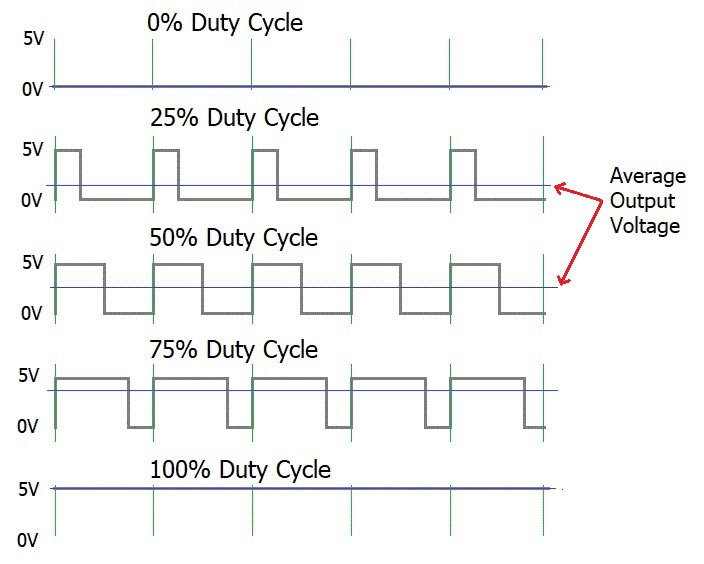
Pulse width modulation and duty cycle example - credit circuitdigest.com
While there is an overall screen refresh frequency factor to consider as it pertains to health, in short, given a fixed frequency, to reduce the brightness, the color cell is extremely rapidly turned on and off.
This is complex, so we're going to simplify it a bit. A 50% duty cycle has the cell on or off half of the time, and is about half the brightness. It also effectively strobes the user at a different frequency than the display as a whole is doing.
Pulse Width Modulation has been used in OLED iPhones since the iPhone X. It has always been a health concern at some level, to some people.
If you haven't had sensitivity with your iPhone or iPad before, that doesn't necessarily mean that you'll be fine with the MacBook Pro.
For the new MacBook Pro, it's not the entire field of vision, but it is a wide one. The pulse width modulation, which is not the same as the screen refresh rate, is running at 240Hz on the new MacBook Pro, with a 56% flicker amplitude. This is the same as it is on modern iPhones, but it is also on a much larger screen, and as such, a wider field of vision at relatively close range.
Sensitivity to strobing lights is also aggravated by fatigue of any sort, diet, time of exposure to the strobing and a host of other situations. If you're well-rested, you may not be sensitive to strobing lights.
If you've skipped a meal, are pulling an all-nighter in front of your MacBook Pro, and didn't get any sleep the previous night, that's about the worst-case scenario.
Our advice is the same as it has always been. If you start feeling strange in any way while using the new MacBook Pro, or for that matter, anything with a screen, stop using it. Talk to your doctor about it.
And if you know you have a sensitivity to it, do not buy this MacBook Pro. If it develops in the first few days of use, take advantage of Apple's generous return policy.
And, as always, just because you're not having an issue, doesn't mean that it's not a problem.
MacBook Pro 16-inch review: Thermals and performance
The 16-inch Pro has long been the Mac that runs hottest under sustained load. A redesigned thermal architecture aims squarely at that.

MacBook Pro review: The logo etched into the metal on the bottom of the MacBook Pro
Apple is light on specifics, as ever. At release the company highlighted that redesigned thermal system rather than hard numbers. The promise is more sustained performance with less fan noise. For video editors and developers, that matters more than a headline chip score.
But, we couldn't tell if it actually makes a difference or not. The longer jobs we use to test pro hardware completed in the same time within the margin of error for multiple runs. Acoustic testing while getting hammered with work was also within the margin of error, using our faithful Kanomax meter we've been using for years.
So, in practice, that's all about the same as the previous M5 Pro and M5 Max offerings. As with the previous model, exporting a 15-minute 4K video file out of Final Cut Pro wasn't enough to get the fans kicking in beyond a mild hum part way through the task.
More intensive local AI tasks, rendering complex models in Blender, or working in Spatial video are going to be the activities to get these fans humming.
Also the same, is the chip choice. Regarding those chips, the same M5 Pro and the M5 Max are here. Both use an 18-core CPU, with six super cores and twelve performance cores, per Apple's spec.
The M5 Pro pairs that with a 20-core GPU. The M5 Max steps up to 32 or 40 GPU cores, and as much as 128GB of memory.
Memory bandwidth tops out at 614GB/s on the fastest Max. That is the part that feeds heavy GPU and AI work.
Apple's own figures claim the M5 Pro is up to 10.9 times faster than the M1 Pro, with "up to" doing a lot of work in that claim. The M5 Max is pitched at up to 12 times the M1 Max.
Sure, that's all fine and good. We're sure that Apple got those results somewhere. Your mileage will vary, based on your own workflows, like always.
We're not going to bomb you with benchmarks. They're the same as last time, within less than a percent.

MacBook Pro review: Dock on the MacBook Pro
The read here is that you already run an M-series Pro or Max, the screen is the upgrade here, not the silicon. We think that the redesigned cooling system is more Apple-serving than user-serving, and exists more to keep heat off the screen, than keep the chips cooler.
MacBook Pro 16-inch review: Battery, ports, and audio
Battery holds at the usual 100 watt-hours, the legal ceiling for a laptop. Apple rates the M5 Pro at up to 24 hours of video, and the M5 Max at 22. Our practical testing bore that out.

MacBook Pro review: On the right side, the MacBook Pro has an SDXC card reader, a Thunderbolt 5 port, and an HDMI port
The port selection is unchanged, which is no bad thing at all. You get three Thunderbolt 5 ports, HDMI, an SDXC slot, MagSafe 3, and a headphone jack.
Thunderbolt 5 runs up to 120Gb/s, with DisplayPort 2.1 for high-end external screens. The M5 Max can drive up to four of them. This remains the same as the previous generation.

MacBook Pro review: The left side has a MagSafe 3 charging port, two Thunderbolt 5 ports, an a headphone jack
Wireless moves to Apple's own N1 chip, with Wi-Fi 7 and Bluetooth 6. The webcam stays a 12MP Center Stage unit with Desk View.
Audio steps up to a six-speaker system with force-cancelling woofers. On a laptop people actually watch movies on, that is a welcome touch.
MacBook Pro 16-inch review: Come for the screen, maybe wait for M7
This is the most exciting MacBook Pro in a long time. The PROLED XDR display alone makes it feel like a genuine new chapter.

MacBook Pro review: MacBook Pro is now more portable than ever
Come for that screen, and the rest of the spec sheet will not let you down. The lighter body and (slightly) better speakers only sweeten the deal.
There is a sensible case for patience, though. This is a first-generation OLED, a first touch screen, and a thermal redesign, all at once. The M5 chip is also not even a step from the last version without the touch screen, it's exactly the same.
So if your current Pro still serves you well, the M7 version that we're expecting in November 2027 or so may iron out the early quirks. The display will be just as spectacular, and maybe the new cooling system will get a tune-up with a vapor chamber heat sink that may actually reduce internal temperatures.
But if you are buying today, this is a wonderful machine. Just go in knowing you are paying a first-generation premium to be early.
MacBook Pro 16-inch review - Pros
- PROLED XDR is the best laptop display yet, anywhere
- Lighter body, slimmer borders, better audio
- "Redesigned thermals" but the verdict is still out on this
MacBook Pro 16-inch review - Cons
- Bouncy touchscreen still
- Pulse width modulation may be an issue
- Price premium on top of already hiked prices
Score: 4 out of 5
We hope that Apple keeps around both PROLED and mini LED versions of the MacBook Pro. We've already heard rumblings that they won't, but we'll see how that goes in the fullness of time.
Just the same, the new 2026 MacBook Pro is a very nice machine. The slimmer enclosure and less weight make a giant difference, and so does the new, and gorgeous, screen.
What it does not deliver, is increased performance versus the previous model. If you've got the previous M5 Pro or M5 Max, you won't get work done faster. If you're coming from an older MacBook Pro, it's a nice upgrade, albeit at a cost.
If all you really need is performance, either skip this generation and wait for that M7 model, or get the previously available model without the PROLED premium.
Either way, you get great power, a great screen, and all-day battery life.
Where to buy MacBook Pro 16-inch PROLED
Apple's 16-inch MacBook Pro with a PROLED XDR display is on sale now at popular Apple resellers. Amazon carries the retail configurations, while B&H, Expercom, and Adorama are selling both retail and CTO models.
Our 16-inch MacBook Pro PROLED Price Guide has a detailed breakdown of the best offers and latest availability across the line.
Source: Read original article


Comments ()